
No products in the basket.
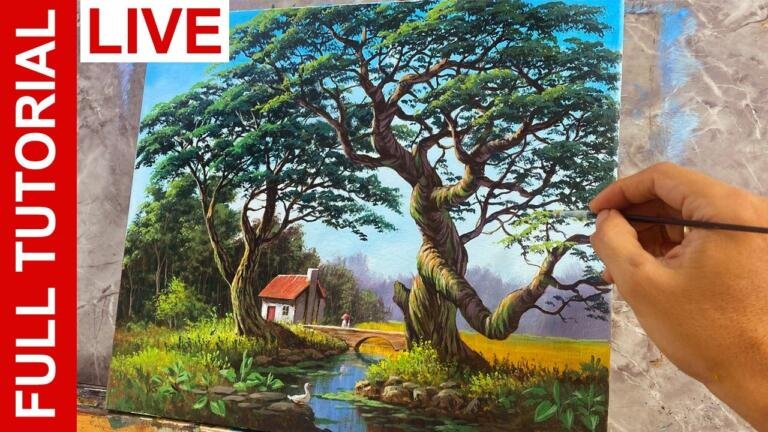
How to Paint an Oak Tree in Real Time Basic Acrylic Painting Tutorial for Beginners by JM Lisondra
Learn how to paint a realistic oak tree in a very easy step by step real time painting tutorial for beginners. In this video you will learn creating the leaves of the tree using a flat brush and also adding highlights and shadows. Please hit like, add some comments and subscribe for more videos.
Subscribe for more videos in the future: http://www.youtube.com/user/artjomalis?sub_confirmation=1
Thank you for watching!
Recommended Art Materials: http://www.jmlisondra.com/blog/v/Recommended_Art_Materials_Availabe_at_Amazon
Become my Patron: https://www.patreon.com/jmlisondra
Website: www.jmlisondra.com
FB Page: https://www.facebook.com/jmlisondraArts
FB Group: https://www.facebook.com/groups/paintwithJMLisondra
Twitter: https://twitter.com/artjoma
G+: https://plus.google.com/+JohnmagneLisondra
Instagram: https://www.instagram.com/artjomalis/
Pinterest: https://www.pinterest.com/jmlisondra
Email: magnean18@gmail.com
Donate: https://www.paypal.me/jmlisondra
Background Music:
Prelude No. 23 by Chris Zabriskie is licensed under a Creative Commons Attribution license (https://creativecommons.org/licenses/by/4.0/)
Source: http://chriszabriskie.com/preludes/
Artist: http://chriszabriskie.com/
Intro Template: https://www.youtube.com/user/IntrosYou

Saman Fatima says:
Why haven’t you created the leaves symmetrically?
Saman Fatima says:
@Art of John Magne Lisondra Thank you!
Art of John Magne Lisondra says:
because trees are not always balanced… other side may have more leaves or branches than the other..
Lisa Yount says:
Plz tell me how your painting has layers. Mine just looks globe on 😕
Bharathi B says:
Pls update brush details in description box..tree is awesome
karryboss boss says:
Superb I always watch Ur painting keep going great guns thank u
Rahma Madani says:
Wow… Amazing😍😱.
Sorry if I may ask, what do you paper use?
yolanda ferreyra says:
Me encanta ver los tutoriales lástima no esta en español
Technical anjali says:
Nice
Sonal d souza says:
Very helpful tutorial :)
Love from India!
Jt says:
John I love your videos and style. Do you let each layer dry before moving from shadow tone, to mid tone, then highlights?
I needed this video for a recent painting that I was struggling to get an oak tree right. This video really helped.
Thanks for your content John. 👍🏼
Jt says:
Art of John Magne Lisondra thank you John. I’ll try both ways and see what’s better. 😎
Art of John Magne Lisondra says:
you’re welcome… you can let it dry of add layers when it’s still wet.. but acrylics dry very fast so no need to wait it dry just add the layers when it’s haft wet…
ฮิปโป พุงโตโต says:
สวยค่ะ💚💚👍👍
V. M. says:
Wonderful.
Cecilia says:
Loved the tutorial! It’s helping me a lot on getting the idea for a tree that I am painting. I’m having trouble creating those “leaves” on the tree since I’m drawing on a bigger scale (it’s almost like a mural tree). What kind of brush would you recommend for a much bigger tree and have almost the same effect that you have on your video?
I’m painting it on a canvas, I’m using acrylics and… I just erased the whole thing right now :( because at the end it seemed like I was just painting big dots for the highlights.
Art of John Magne Lisondra says:
you can use bigger flat brush like 4 inches
Huchen Courouleau says:
Thanks a lot even though mine looks like a hot mess now and no idea what went wrong :(
Phyllis Tillman says:
I found that if I let the layers dry before apply the next it helped. Also make sure you let the darker layer show, don’t cover then up ,paint above them
Gabriela Petrova says:
Your videos are truly amazing! Thank you!
Jo Ann Golis says:
Thank you so much for this video. You are a fantastic teacher.
Bhagyashree Naik says:
Do we add very less colour on the brush to get this look? Can you give some tips on how to make this please?
Art of John Magne Lisondra says:
you can always control the paints on your brush… just use small amounts if possible… all the tips are in the tutorial…
SUNDER SINGH says:
I am from India. Jabardast
SUNDER SINGH says:
Hi Sir
SUNDER SINGH says:
Thanks for this tutorial. I have no words to explain my feeling to you. Speechless.😘😘😘😘😘😘😘😘
SUNDER SINGH says:
@Art of John Magne Lisondra
Thank you so much & welcome
SUNDER SINGH says:
@Art of John Magne Lisondra Love you
timairglider says:
Thats amazing how you build the different shades to give a 3D effect, you are very talented.
Art of John Magne Lisondra says:
thank you Timairglider..
Seven Seven says:
Thank you🙏🏻